

Most people building their first digital product think a website and a web platform are the same thing. They are not, and that confusion leads to real project failures, misaligned budgets, and technology choices that become expensive to undo. Understanding what is a web platform, how it differs from a simple website, and what it actually contains gives you a meaningful edge before you spend a dollar on development. This guide breaks down the definition of web platform, its core components, and the practical examples that matter most for individuals and businesses making technology decisions today.
Table of Contents
- Key takeaways
- What is a web platform: core components explained
- Core web technologies and open standards
- Websites, frameworks, and platforms compared
- Types of web platforms and real-world applications
- My honest take on web platform decisions
- Build your web platform with the right team
- FAQ
Key takeaways
| Point | Details |
|---|---|
| Platform vs. website | A web platform is the full technology stack; a website is just the content delivered through it. |
| Core components | Every web platform includes a web server, programming language, database, framework, and APIs working together. |
| Open standards matter | W3C open standards give platforms cross-device compatibility without rebuilding for each browser or device. |
| Frameworks are not platforms | A framework structures your code; a platform provides the entire operating and integration environment. |
| Choosing the right type | Matching the platform type to your actual use case prevents vendor lock-in and long-term maintainability problems. |
What is a web platform: core components explained
A web platform is not a single product you download or subscribe to. It is an integrated collection of technologies working together to build, run, and manage web applications and websites. Think of it less like a tool and more like a construction system. A website is the building. The web platform is the land, the foundation, the electrical grid, and every tool used to put the structure together.
That distinction matters enormously when you are planning a digital project. The visible part, the pages users see and click through, is only the surface. Underneath sits a stack of interconnected systems that determine how fast your product loads, how securely it handles data, and how well it scales when your user count doubles.
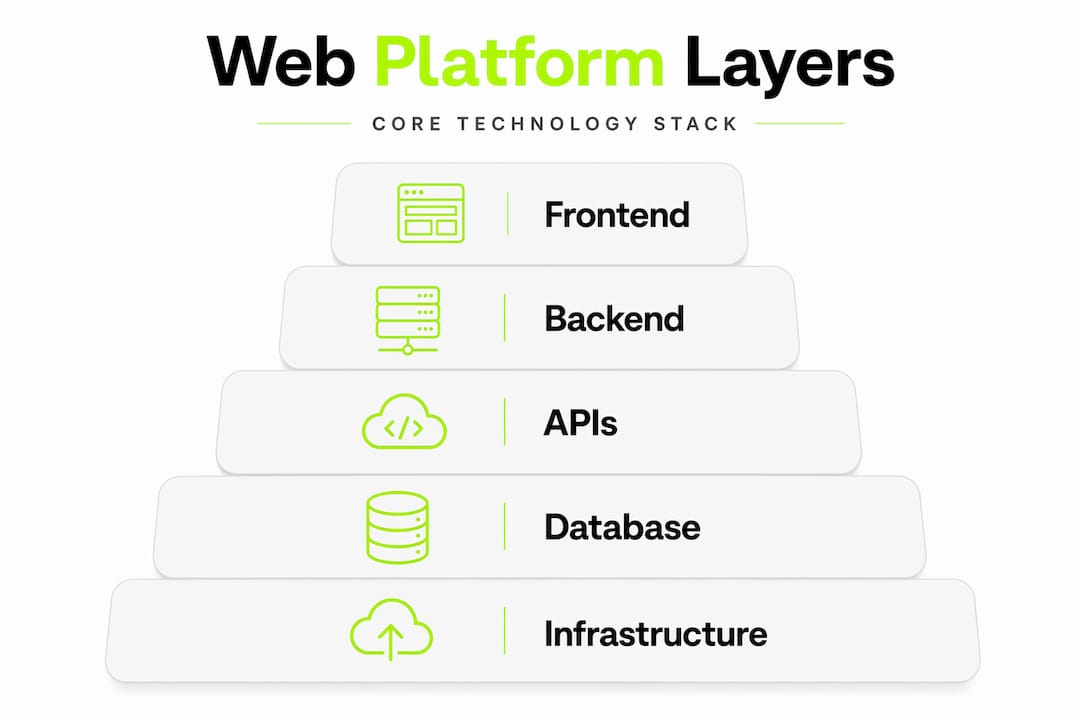
The main components of any web platform include:
- Web server: Handles requests from browsers and delivers responses. Apache and Nginx are common examples.
- Programming language and framework: The code that powers application logic. Python with Django, JavaScript with Node.js, or PHP with Laravel are typical combinations.
- Database: Stores and retrieves structured data. PostgreSQL, MySQL, and MongoDB are widely used depending on the data model.
- APIs: Allow different systems and services to communicate. A payment gateway, a mapping service, or an authentication provider all connect through APIs.
- Content delivery and hosting infrastructure: The servers, cloud environments, and networks that keep everything running and accessible globally.
These components do not operate independently. They form an environment where each layer depends on the others. A change to your database schema affects your API. A change to your framework affects how your server processes requests. That interdependence is exactly what separates a platform from a standalone website.
Pro Tip: When evaluating any web platform for your project, map out which of these five components are managed for you and which you control directly. Managed components reduce overhead but limit customization. Controlled components offer flexibility but require technical expertise.
Core web technologies and open standards
The web platform runs on a set of technologies that have been standardized so that applications work consistently across browsers, devices, and operating systems. The W3C defines an open web platform as one built on open standards that allow developers to create rich, interactive applications accessible on any device, with implementation that is royalty-free and fair.
At the technology layer, the web platform includes HTML, CSS, JavaScript, and a wide array of browser APIs that enable interaction with device hardware, networks, storage, media, and payment systems. These are not separate tools. They are the shared vocabulary that every browser understands, which is why a web application built to these standards can run in Chrome on a laptop and Safari on a phone without being rebuilt from scratch.
"Interoperability provided by open, royalty-free web standards enables the same application experience across different browsers and devices without needing rebuilds. This is crucial for businesses to reach broad audiences efficiently." — W3C Web Standards
Several principles guide how web platform technologies evolve. According to the W3C design principles, the platform is built with safety, media independence, and support for diverse devices as core requirements. That means a well-built web platform should protect user data, work whether someone is on a screen reader or a 4K monitor, and adapt to new device types without requiring a full architectural overhaul.
Progressive web apps, or PWAs, are a practical example of how these standards extend platform capabilities. A PWA uses standard web technologies to deliver app-like experiences, including offline access, push notifications, and home screen installation, without requiring distribution through an app store. That is the web platform expanding what is possible through open standards rather than proprietary technology.
For businesses, the practical benefit of open standards is long-term viability. A platform built on W3C-compliant technologies is not dependent on a single vendor's roadmap. If a browser vendor changes direction, the standards body provides continuity. That is a meaningful risk reduction for any organization investing in a long-term digital product.
Websites, frameworks, and platforms compared
The three terms that cause the most confusion in early-stage planning are website, framework, and web platform. They are related but they describe fundamentally different things, and mixing them up leads to misaligned expectations between business owners and development teams.
A website is the client-visible content delivered through a browser. It is what users read, watch, and interact with. A web platform is the underlying infrastructure and technologies enabling creation, deployment, and management of that content. The website is what you see. The platform is everything that makes seeing it possible.

A framework is different from both. Frameworks help structure code; platforms bundle operating and integration environments. React is a framework. It gives developers a structured way to build user interfaces. But React alone does not handle your database, your server, your deployment pipeline, or your authentication system. A platform does all of that. The distinction directly affects vendor lock-in and long-term maintainability, which are two of the most underestimated factors in technology decisions.
| Concept | Role | Scope | Examples |
|---|---|---|---|
| Website | Delivers content to users | Front-end, user-facing | A company homepage, a blog |
| Web platform | Enables building and running web products | Full technology stack | AWS Amplify, Google App Engine |
| Framework | Structures application code | Code organization layer | React, Django, Laravel |
| CMS platform | Manages and publishes content | Content and publishing | WordPress, Webflow |
Pro Tip: When a vendor calls their product a "platform," check whether it actually provides server infrastructure, database management, and API integration, or whether it is really just a framework with good marketing. The MDN Web API guides are a reliable reference for checking which browser-level capabilities a platform actually exposes.
Understanding this distinction is not just academic. If you hire a development team to build on a framework and call it a platform, you may end up with a product that cannot scale, cannot integrate with other services, and requires a complete rebuild when your needs grow.
Types of web platforms and real-world applications
Once you understand the definition, the next question is which type of web platform fits your situation. The answer depends on what you are trying to build, how much control you need, and how fast you need to move.
Here are the main types of web platforms and where they are most commonly used:
- Content management systems (CMS): Platforms like WordPress power a significant portion of the web. They are designed for publishing content without requiring code. Businesses use them for blogs, marketing sites, and documentation portals. WordPress and similar CMS platforms continue to dominate but growth is shifting toward niche-focused platforms built for specific industries and use cases.
- E-commerce platforms: These provide the infrastructure for online selling, including product catalogs, shopping carts, payment processing, and order management. Shopify is the most recognized example, but enterprise-level businesses often build custom e-commerce platforms on top of cloud infrastructure for greater control.
- SaaS platforms: Software-as-a-service products are themselves web platforms. Salesforce, Notion, and Figma are web platforms that other businesses and individuals use to run workflows. Building a SaaS product means building a web platform from the ground up.
- Internal tools and operational platforms: Many businesses build private web platforms for internal use. CRM systems, inventory management tools, data pipelines, and reporting dashboards are all examples. These are not public-facing, but they are full web platforms with all the same components.
- Cloud application platforms: Services like Google App Engine or Heroku provide the server, runtime, and deployment infrastructure so development teams can focus on application code rather than infrastructure management.
When evaluating which type fits your needs, the features of a web platform worth examining include scalability (can it handle ten times your current load), extensibility (can you add new functionality without rebuilding), security controls, API availability, and the level of vendor dependency you are comfortable accepting. Evaluating browser API availability, including storage, networking, media, and payment capabilities, is a practical starting point for technical teams mapping feature requirements.
The benefits of web platforms over building from scratch are significant for most businesses. Managed infrastructure reduces the engineering overhead of keeping servers running. Pre-built integrations accelerate development timelines. And established platforms come with security practices and compliance frameworks that would take months to build independently.
My honest take on web platform decisions
I have worked with enough teams to say with confidence that the platform decision is almost always made too fast and with too little information. What I see repeatedly is a founder or product manager picking a platform based on what they have heard of, not what actually fits their architecture.
The most common mistake is confusing a good developer experience with a good platform choice. A framework that is pleasant to code in does not mean it is the right platform for your business. In my experience, the teams that struggle most are the ones who chose based on popularity and then discovered, twelve months later, that they had built themselves into a corner with no clean path to the features they needed next.
What I have learned is that the right question is not "which platform is best?" It is "what does this platform make easy, and what does it make hard?" Every platform has constraints. The architectural distinction between frameworks and platforms influences vendor lock-in and ecosystem sustainability in ways that only become visible after you are committed. I would rather a team spend two extra weeks in evaluation than six months rebuilding.
The future of web platforms is moving toward greater specialization. The era of one-size-fits-all platforms is fading. What I see gaining ground are platforms purpose-built for specific verticals, with tighter integration, better defaults, and less configuration overhead. For businesses, that means the evaluation process is getting more nuanced, not less. Getting clarity early, before you write a line of code, is the highest-leverage thing you can do.
— Eldar
Build your web platform with the right team
If this article clarified what a web platform actually is, the next step is knowing what to do with that clarity.
Daynight specializes in building custom web platforms tailored to specific operational needs, from CRM systems and internal tools to data pipelines and client-facing applications. The process starts with a discovery phase that maps your actual requirements to the right technology stack, so you are not inheriting someone else's architectural decisions. With 99.98% uptime and ongoing operational support, the platforms Daynight builds are built to run. Explore the Daynight project portfolio to see how custom web platforms have been delivered across different industries, or visit Daynight's engineering studio to start a conversation about your specific needs.
FAQ
What is a web platform in simple terms?
A web platform is the full technology stack that powers web applications and websites, including the server, database, programming language, and APIs. It is the environment that makes building and running web products possible, not just the content users see.
What are some examples of web platforms?
Common examples of web platforms include WordPress for content management, Shopify for e-commerce, Salesforce for CRM, and Google App Engine for cloud application hosting. Internal tools like custom CRM systems and data dashboards are also web platforms.
How does a web platform differ from a website?
A website is the content delivered to a user's browser. A web platform is the underlying infrastructure and technology stack that creates, hosts, and manages that content. Think of the website as the building and the platform as the foundation and construction system.
What is the difference between a framework and a web platform?
A framework structures how code is written within an application. A web platform provides the complete operating environment, including server infrastructure, database management, and integration capabilities. A framework is one component that may run inside a platform.
What features should I look for in a web platform?
Key features to evaluate include scalability, API availability, security controls, extensibility, and the level of vendor dependency. Browser API capabilities covering storage, networking, media, and payments are a practical checklist for technical teams assessing platform fit.