

Getting your mobile app backend architecture setup wrong early is expensive to fix later. Most teams discover this after their app hits real traffic and the cracks appear: slow API responses, dropped requests, security gaps, and infrastructure costs that spiral out of control. This guide walks you through the foundational decisions, practical setup steps, and hard-won trade-offs that determine whether your backend holds up or falls apart. From choosing the right architecture type to configuring authentication, databases, and push notifications, you will leave with a concrete plan you can act on.
Table of Contents
- Key takeaways
- Mobile app backend architecture setup: the foundation
- Choosing your architecture type and tech stack
- Setting up a scalable, secure backend step by step
- Push notifications and async workflows
- Common pitfalls and performance optimization
- My honest take on backend architecture decisions
- How Daynight can set up your backend right
- FAQ
Key takeaways
| Point | Details |
|---|---|
| Start with layered architecture | Separate UI, domain, and data layers from day one to reduce coupling and improve testability. |
| Match architecture type to team size | A modular monolith outperforms microservices for most early-stage teams; extract services only when boundaries are clear. |
| Security is not optional | Apply TLS, least-privilege IAM, API throttling, and encryption at rest before your first production release. |
| Push notifications need lifecycle management | Token rotation, deduplication, and async dispatch pipelines separate reliable notifications from flaky ones. |
| Cloud services reduce time-to-market | Managed services like API Gateway, Cognito, and DynamoDB let small teams ship production-grade backends faster. |
Mobile app backend architecture setup: the foundation
Before you write a single line of server code, you need a clear mental model of how the pieces connect. The client-server model is the backbone of every mobile backend. Your app sends requests; the backend processes them, applies business logic, and returns data. The API layer is the contract between those two worlds.
Android's reference architecture formalizes this with three distinct layers:
- UI layer: Handles presentation and user interaction only. No business logic lives here.
- Domain layer: Contains use cases and business rules. This is where decisions happen.
- Data layer: Manages data sources, repositories, and external service calls.
The repository pattern sits at the boundary between the domain and data layers. It abstracts whether data comes from a local cache, a remote API, or a database. This separation is not just clean code theory. Layered architecture directly reduces coupling, which means you can swap a database or change an API endpoint without rewriting your business logic.
Pro Tip: Define your repository interfaces before you implement them. This forces you to think about what data your domain actually needs, rather than what your database happens to store.
Business logic belongs in the backend, not the mobile client. Putting validation, pricing rules, or access control in the app creates security vulnerabilities and makes updates painful. The backend owns the truth; the app only displays it.
Choosing your architecture type and tech stack
This is where most teams make their biggest mistake. They read about microservices, get excited about independent scaling and deployment, and build a distributed system before they have a product anyone uses.
Microservices introduce real complexity: service discovery, distributed tracing, eventual consistency, and inter-service communication failures. A monolith, by contrast, offers simpler debugging, faster local development, and better performance for teams that are not yet at scale. The pragmatic path is to start with a modular monolith and extract services only when you have clear, stable boundaries and a genuine scaling reason.
Here is how the three main architecture types compare:
| Architecture | Best for | Trade-offs |
|---|---|---|
| Modular monolith | Early-stage teams, MVPs, small engineering orgs | Simpler to build and debug; harder to scale individual components |
| Microservices | Large teams with clear service boundaries | Independent scaling; high operational overhead |
| Serverless | Event-driven workloads, variable traffic | Low cost at idle; cold starts and vendor lock-in risks |
For mobile backend development, the typical technology stack choices break down by use case:
- Node.js with Express or Fastify: High throughput, non-blocking I/O, large ecosystem. Strong choice for API-heavy backends.
- Python with FastAPI or Django: Excellent for data-heavy apps, ML integration, or teams with Python expertise.
- AWS Lambda (serverless): Works well for async tasks, webhooks, and workloads with unpredictable traffic spikes.
- Containers on ECS or EKS: Right for teams that need portability and fine-grained control over runtime environments.
On the managed side, MBaaS platforms like Firebase or Back4app let teams ship production-grade APIs in days rather than months by offloading server administration, security patching, and scaling. The trade-off is less control, which matters if you have strict compliance requirements or unusual data models.
Pro Tip: If you are evaluating managed backend services, check whether the platform supports custom business logic hooks. Without them, you will hit a ceiling the moment your product requirements get specific.
Setting up a scalable, secure backend step by step
This is the section most guides skip over with vague advice. Here is what a real mobile app server setup looks like on AWS, which remains the most widely used cloud platform for app server architecture in 2026.
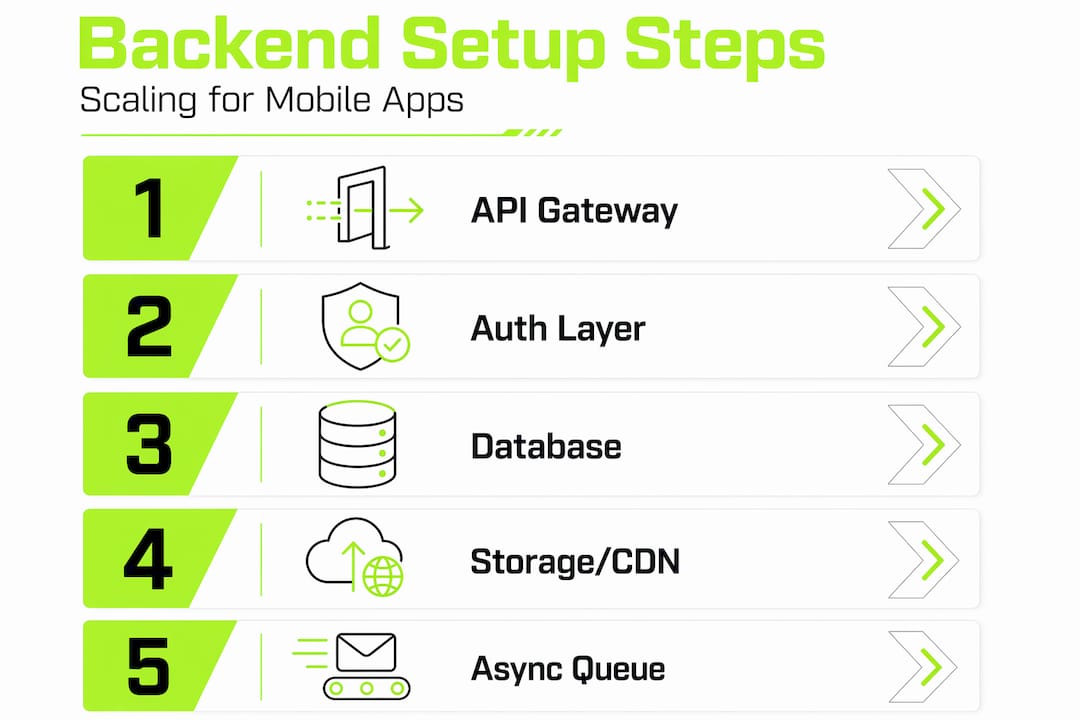
Step 1: API Gateway and versioning
Your API Gateway is the front door. It handles routing, rate limiting, and request validation before traffic ever reaches your compute layer. Version your APIs from the start using path prefixes like "/v1/and/v2/`. This lets you evolve the contract without breaking existing app versions in the wild.
Step 2: Authentication
Use a managed identity provider rather than rolling your own. Amazon Cognito handles user pools, OAuth 2.0 flows, and JWT token issuance. For most mobile apps, this covers sign-up, sign-in, and social login without custom auth code.

Step 3: Database selection
| Use case | Recommended database | Reason |
|---|---|---|
| Flexible, high-scale reads/writes | DynamoDB | Managed NoSQL, auto-scales, low latency |
| Relational data with complex queries | RDS (PostgreSQL) | ACID compliance, joins, strong consistency |
| Real-time sync | Firebase Firestore | Built-in mobile SDKs, offline support |
Step 4: Storage and CDN
Store user-uploaded files in S3 and serve them through CloudFront. This combination gives you cost-efficient storage with global edge caching, which cuts latency for media-heavy apps significantly.
Step 5: Async messaging
Not every operation needs a synchronous response. Use SQS for task queues and SNS for fan-out messaging. Sending a welcome email, processing an image, or triggering a webhook should all go through a queue rather than blocking the API response.
Step 6: Security
Effective backend security requires multiple layers working together. Apply these without exception:
- TLS on every connection, no exceptions for internal services
- Least-privilege IAM roles: each Lambda or service gets only the permissions it needs
- API throttling to prevent abuse and runaway costs
- Encryption at rest for all databases and S3 buckets
- Request validation at the API Gateway layer before requests reach compute
Pro Tip: Run AWS IAM Access Analyzer regularly. It surfaces overly permissive policies that accumulate over time as teams add features without cleaning up old permissions.
Push notifications and async workflows
Push notifications look simple until they break silently. A notification that fails to deliver does not throw an error your logs will catch. It just disappears.
A reliable push notification architecture separates responsibilities across three components:
- Mobile app: Acquires the device token on startup and re-registers it every time the app comes to the foreground. OS updates can rotate tokens without warning.
- Backend storage: Stores tokens with metadata including user ID, platform, and registration timestamp. Cleans up dead tokens automatically after failed delivery attempts.
- Dispatch worker: Sends notifications asynchronously through a queue. Never send push notifications synchronously inside an API request handler.
Token lifecycle management is where most teams cut corners and pay for it later. Tokens expire. They get rotated by iOS and Android OS updates. If your backend does not handle re-registration defensively, you end up with a growing list of stale tokens and a notification delivery rate that quietly degrades.
Deduplication matters too. If a user opens your app on two devices, or reinstalls it, you may end up with duplicate tokens in your database. Your dispatch worker needs to deduplicate before sending, or users receive the same notification twice.
Pro Tip: Store the timestamp of the last successful delivery for each token. If a token has not had a successful delivery in 30 days, treat it as expired and remove it proactively.
Common pitfalls and performance optimization
The mistakes that hurt most in mobile backend development are not the ones you make during setup. They are the ones you make six months later when you are moving fast and skipping steps.
The most common pitfalls:
- Premature microservices adoption. Splitting a 2,000-line codebase into eight services adds operational overhead without meaningful benefit. Wait until you have a team of at least 10 engineers and clear service ownership.
- Ignoring monitoring from day one. If you do not have distributed tracing, structured logging, and alerting before launch, you are debugging production incidents blind.
- Insufficient API versioning. Mobile apps live on user devices you cannot force-update. An API breaking change can strand a significant percentage of your user base.
- Skipping database indexing. A query that runs in 5ms on 1,000 rows runs in 4 seconds on 1 million rows without the right indexes.
On the performance side, serverless and managed services scale to zero when idle and auto-scale under load, which makes them cost-efficient for apps with variable traffic. But serverless cold starts add latency. For latency-sensitive endpoints, keep a small pool of warm containers running rather than relying entirely on serverless.
Cost control in cloud environments requires the same discipline as performance optimization. Set billing alerts, use reserved capacity for predictable workloads, and audit unused resources monthly.
When it comes to migrating from monolith to microservices, the strangler fig pattern works better than a big-bang rewrite. Extract one module at a time, route traffic incrementally, and validate each extraction before moving to the next. This approach keeps your system running while you improve it.
My honest take on backend architecture decisions
I have worked through enough backend architecture projects to have strong opinions on this. The biggest mistake I see teams make is treating architecture as a status decision rather than a practical one. Microservices are not a sign of technical maturity. They are a tool for a specific problem. Most teams do not have that problem yet.
In my experience, a well-structured modular monolith with clear module boundaries will outperform a poorly designed microservices system every time. The monolith-first approach is not a compromise. It is the smarter starting point for teams that want to move fast without accumulating infrastructure debt they cannot pay down.
What I have found actually works: define your module boundaries as if they were service boundaries from day one. Keep your modules loosely coupled inside the monolith. When you eventually extract a service, the boundary is already clean. You are not untangling spaghetti. You are just moving a well-defined module behind a network call.
Serverless is genuinely useful, but as a complement, not a foundation. I use it for async workers, scheduled jobs, and event processors. I would not build a core transactional API on Lambda if I expected consistent sub-100ms response times.
The teams I have seen succeed at mobile backend development share one trait: they invest in observability before they invest in optimization. You cannot fix what you cannot see.
— Eldar
How Daynight can set up your backend right
If you are building a mobile product and want the architecture done right from the start, Daynight has done this before. The team at Daynight specializes in building tailored backend systems for mobile and web platforms, covering everything from API design and database selection to cloud infrastructure and ongoing operational support. With 99.98% uptime and a four-stage process that prioritizes transparent communication, Daynight delivers backends that scale with your product rather than against it. Browse the client projects to see how the team has approached backend architecture across different industries and scales.
FAQ
What is the best architecture for a mobile app backend?
For most teams, a modular monolith is the best starting point. Extract services into microservices only when you have clear boundaries and genuine scaling requirements that the monolith cannot meet.
How do I choose between DynamoDB and RDS for my mobile app?
Use DynamoDB when you need high-throughput, flexible schema access patterns at scale. Use RDS with PostgreSQL when your data is relational, requires complex queries, or needs strong consistency guarantees.
How does mobile app backend architecture handle push notifications reliably?
Reliable push notification delivery requires token lifecycle management, async dispatch through a queue, and automatic cleanup of expired or dead tokens after failed delivery attempts.
What security measures are non-negotiable for a mobile backend?
Least-privilege IAM, TLS on all connections, API throttling, request validation, and encryption at rest are the baseline. None of these are optional for a production system.
When should I use a managed backend service instead of building my own?
Use a managed backend service when speed-to-market is the priority and your compliance or customization requirements are standard. Build your own when you need specific data control, custom business logic, or have regulatory constraints the platform cannot meet.